


How to Find and Fix Broken Links Before They Hurt Your SEO
Every website accumulates broken links over time. Pages get deleted, URLs get restructured, external sites you once linked to shut down or reorganize their content. Left unchecked, broken links quietly damage two things at once: the experience for real visitors who hit a dead end, and the crawl efficiency and link equity search engines use to evaluate your site.
The good news is that fixing them is one of the highest-value, lowest-effort technical SEO tasks you can do. Here's how to find them, prioritize them correctly, and fix each type the right way.
Not All Broken Links Are Equally Urgent
Before you start hunting for 404s, it helps to know that broken links come in three distinct types — and they don't deserve equal attention.
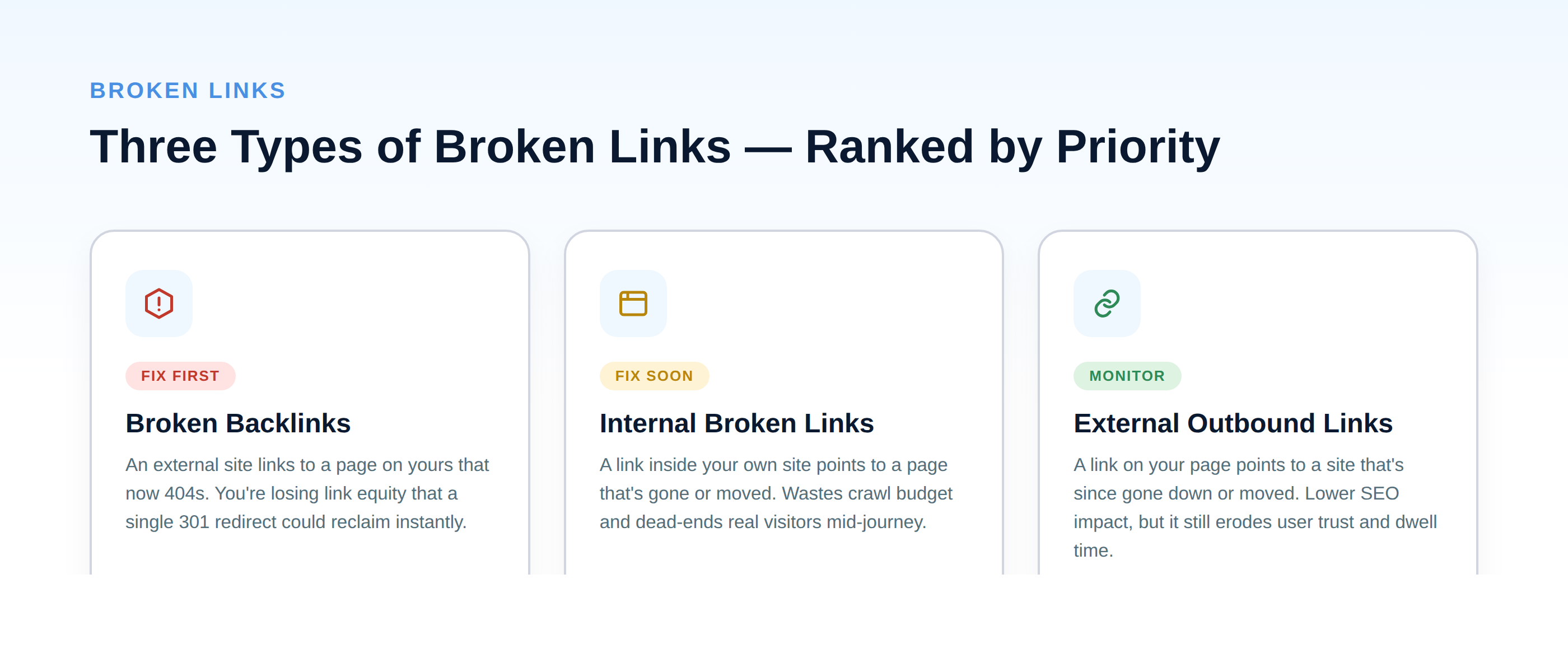
- Broken backlinks — another website links to a page on yours that no longer exists. This is the highest priority: you're actively losing the link equity that page was passing you, and a single redirect recovers it instantly.
- Internal broken links — a link somewhere on your own site points to a page that's gone or moved. These waste crawl budget, dead-end real visitors, and can quietly cut off internal link equity from reaching pages that need it.
- External outbound links — a link on your page points to another site that's since gone down or restructured. Lower direct SEO impact, but it still signals an unmaintained page to both users and, over time, to search engines evaluating content quality.
Fix in that order. A broken backlink pointing at a dead page is money left on the table; a stale outbound link to a defunct blog post is a much smaller problem.
Step 1: Find Your Broken Links
You don't need an expensive tool stack to do this properly. A few free and freemium options cover almost everyone's needs:
- Google Search Console. Under the Pages report, filter for "Not found (404)" to see URLs on your own site that Google has tried to crawl and failed. This is your first stop and costs nothing.
- Screaming Frog SEO Spider (free tier). Crawls up to 500 URLs for free and lists every internal and external link returning a 4xx or 5xx status. For most small sites, the free tier alone is enough to run a full audit.
- A dedicated backlink tool (Ahrefs, Semrush, or similar). These are the best way to specifically find broken backlinks — external sites linking to your dead pages — since Search Console and a standard crawler can't see links coming from other domains. Most offer a limited free broken-link check even without a subscription.
- Free online broken link checkers. Several web-based checkers will crawl a site's public pages and flag dead links without requiring any install, which is enough for a quick one-off check on a smaller site.
Run at least the Search Console check and one crawler-based check — they catch overlapping but not identical sets of issues, and combining them gives you a much more complete picture than either alone.
How to Find Broken Backlinks (and Reclaim the Equity)
Broken backlinks deserve their own pass, because they are the only type on that list where the value is already sitting there waiting to be collected. Somebody else decided your page was worth linking to. The link still exists on their site. It just points at a URL that now returns a 404, so none of that equity reaches you.
They are also the type most people miss, for a mechanical reason: Search Console will not show them to you. Its Pages report covers URLs Google tried to crawl on your site, and a crawler like Screaming Frog covers links it can reach by walking your pages. Neither can see a link sitting on somebody else's domain. That is why this needs a backlink tool rather than a site crawler.
Finding them. In Ahrefs it is Site Explorer → Backlinks → Broken. In Semrush it is the Backlink Analytics report filtered to lost or broken target URLs. Both do the same job: list external pages linking to URLs on your domain that no longer resolve. Sort by the referring domain's authority, because a broken link from one strong site is worth more than a dozen from weak ones.
Fixing them, in order of effort:
- Redirect first. If the dead URL has a reasonable successor, a 301 to it recovers the equity immediately and needs nothing from anyone else. This resolves the large majority of broken backlinks and costs you one line of config.
- Restore the page if it was deleted and nothing replaces it, but the link suggests genuine demand. A page other sites chose to cite is usually worth having.
- Ask, last. Outreach to the linking site to have the URL corrected is the slowest option with the lowest hit rate, and it is only worth it when the referring domain is strong enough to justify the email and no redirect will do.
The offensive version. The same report run against a competitor — or against any dead resource in your niche — is the basis of broken link building: find a page that has accumulated links and since died, write something that genuinely replaces it, then tell the sites still pointing at the corpse. It works, but it is an outreach campaign rather than a technical fix, and the reply rate is what decides whether it was worth the time.
Step 2: Decide How to Fix Each One
Once you have a list, the fix depends on a single question: does content that could reasonably answer the same need still exist somewhere on your site?
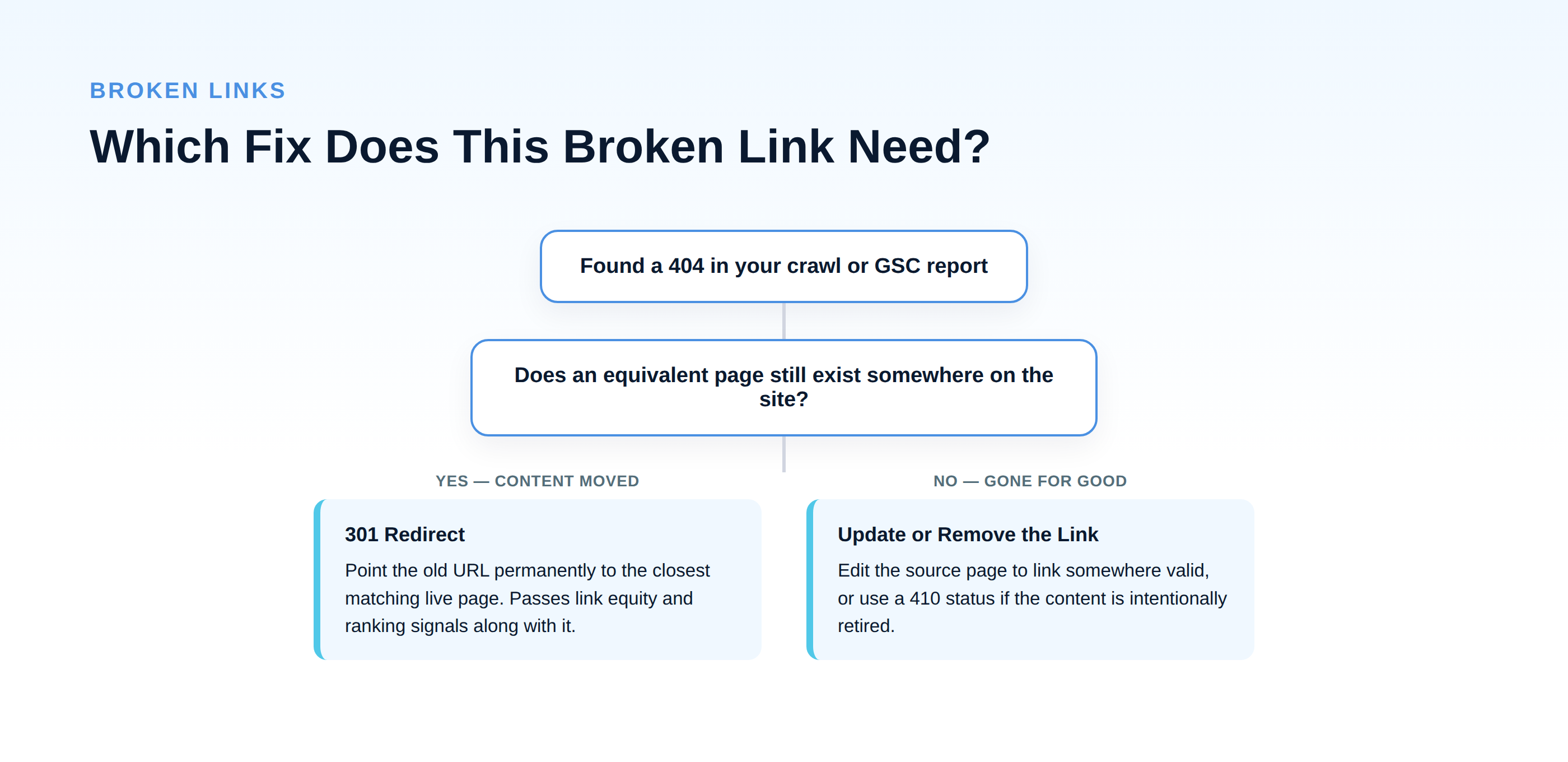
If yes — the content moved or was consolidated: set up a 301 redirect from the old URL to the closest matching live page. A 301 is a permanent redirect and passes along the ranking signals and link equity the old URL had accumulated, which is exactly why it's the right fix for a broken backlink specifically — you recover value that would otherwise just be lost.
If no — the content is genuinely gone: you have two options. Either edit the source page so the link points somewhere valid, or, if the removed content was intentional and permanent, serve a 410 status instead of a plain 404. A 410 explicitly tells search engines "this is gone on purpose," which can lead to faster removal from the index than a 404 that search engines might keep re-checking indefinitely.
One thing to avoid: redirecting everything to your homepage as a catch-all fix. It resolves the broken link technically, but it's a poor experience for anyone following that link expecting specific content, and search engines increasingly discount redirects that don't lead somewhere genuinely relevant.
Step 3: Implement the Fixes
How you implement redirects depends on your platform:
- WordPress — a dedicated redirect plugin (or the redirect manager built into many SEO plugins) lets you add 301 redirects without touching code, and most log 404 hits automatically so you can catch new ones as they appear.
- Static sites or custom builds — redirects are typically handled at the server or hosting config level (a
_redirectsfile,.htaccess, or your host's redirect rules dashboard, depending on platform). - Ecommerce platforms (Shopify, and similar) — most have a built-in URL redirect tool in the admin settings specifically for this purpose.
After implementing a batch of fixes, re-crawl the affected URLs to confirm they now resolve correctly rather than just assuming the fix worked. It's a five-minute check that catches typos in the redirect target before they sit unnoticed for months.
Step 4: Prevent the Backlog From Rebuilding
Fixing broken links once is useful; treating it as a recurring process is what actually protects your rankings long-term.
- Set a recurring crawl. Run a lightweight crawl monthly, or after any major content cleanup or site migration — these events are when broken links spike hardest.
- Watch Search Console's 404 report as part of your routine check-in, not as a separate project you remember to do occasionally.
- Add a redirect step to your content deletion process. Whenever a page is deleted or a URL changes, redirecting it should be a required step before publishing, not an afterthought discovered three months later in an audit.
- Check external links on your highest-traffic pages twice a year. These pages have the most riding on a good user experience, so it's worth periodically confirming everything you link out to still resolves.
The Takeaway
Broken links are one of the few SEO issues with a completely mechanical fix — find them, classify them by type, apply a redirect or update the link, done. The value isn't in any single fix; it's in making the check routine enough that a site never accumulates the kind of backlog that takes a weekend to clean up. Fifteen minutes a month beats a four-hour audit twice a year, and it protects the link equity you've already earned instead of leaking it silently.